Software Library: MS-DOS Games


4.083 títulos que podemos jugar directamente en nuestro ordenador sin necesidad de instalar nada. Vale la pena echarle un vistazo. Te recordara otros tiempos dependiendo de la edad que tengas.

https://archive.org/details/softwarelibrary_msdos_games

Día del Año


using System;
using System.Collections.Generic;
using System.ComponentModel;
using System.Data;
using System.Drawing;
using System.Linq;
using System.Text;
using System.Threading.Tasks;
using System.Windows.Forms;

namespace OrdinalFecha_Forms
{
    public partial class Form1 : Form
    {
        public Form1()
        {
            InitializeComponent();
        }

        private void button2_Click(object sender, EventArgs e)
        {
            Application.Exit();
        }

        private void button1_Click(object sender, EventArgs e)
        {
            int dia, mes, año;

            dia = int.Parse(textBox1.Text);
            mes = int.Parse(textBox2.Text);
            año = int.Parse(textBox3.Text);

            if (fechacorrecta(dia, mes, año) == 1)
                MostrarOrdinal(diadelaño(dia, mes, año));
            else
                MessageBox.Show("Fecha Incorrecta");
        }

        int bisiesto(int año)
        {
            if ((año % 4 == 0) && (año % 100 != 0) || (año % 400 == 0))
                return 1;
            else
                return 0;
        }
        int diasdelmes(int mes, int a)
        {
            int Numerodias = 0;
            switch (mes)
            {
                case 1:
                case 3:
                case 5:
                case 7:
                case 8:
                case 10:
                case 12: Numerodias = 31; break;
                case 2:
                    if (bisiesto(a) == 1)
                        Numerodias = 29;
                    else
                        Numerodias = 28;
                    break;
                case 4:
                case 6:
                case 9:
                case 11: Numerodias = 30; break;

            }
            return Numerodias;
        }


Convertir a Números Romanos


using System;
using System.Collections.Generic;
using System.ComponentModel;
using System.Data;
using System.Drawing;
using System.Linq;
using System.Text;
using System.Threading.Tasks;
using System.Windows.Forms;

namespace NumerosRomanos_Forms
{
    public partial class Form1 : Form
    {
        public Form1()
        {
            InitializeComponent();
        }
        int numeroentrada;


        private void button2_Click(object sender, EventArgs e)
        {
            Application.Exit();
        }


        private void button1_Click(object sender, EventArgs e)
        {
            int Miles, Centenas, Decenas, Unidades, RestoMiles, RestoCentenas, RestoDecenas, N;

            N = numeroentrada;
            Miles = N / 1000;
            RestoMiles = N % 1000;
            Centenas = RestoMiles / 100;
            RestoCentenas = RestoMiles % 100;
            Decenas = RestoCentenas / 10;
            RestoDecenas = RestoCentenas % 10;
            Unidades = RestoDecenas;


            switch (Miles)
            {
                case 1: textBox2.Text += "M"; break;
                case 2: textBox2.Text += "MM"; break;
                case 3: textBox2.Text += "MMM"; break;
            }
            switch (Centenas)
            {
                case 1: textBox2.Text += "C"; break;
                case 2: textBox2.Text += "CC"; break;
                case 3: textBox2.Text += "CCC"; break;
                case 4: textBox2.Text += "CD"; break;
                case 5: textBox2.Text += "D"; break;
                case 6: textBox2.Text += "DC"; break;
                case 7: textBox2.Text += "DCC"; break;
                case 8: textBox2.Text += "DCCC"; break;
                case 9: textBox2.Text += "CM"; break;
            }


GeeksQuiz


Una pagina para aprender a programar, en distintos lenguajes y varios niveles de aprendizaje, con su compilador en linea.

Vale la pena echarle un vistazo.


http://ide.geeksforgeeks.org/index.php
http://quiz.geeksforgeeks.org/


Números Catalan


En combinatoria, los números de Catalan forman una secuencia de números naturales que aparece en varios problemas de conteo que habitualmente son recursivos. Obtienen su nombre del matemático belga Eugène Charles Catalan (1814–1894).

El n-ésimo número de Catalan se obtiene, aplicando coeficientes binomiales, a partir de la siguiente fórmula:


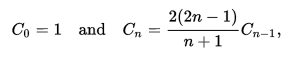
Los números de Catalan satisfacen la siguiente relación de recurrencia:


Y también satisfacen:


using System;
using System.Collections.Generic;
using System.ComponentModel;
using System.Data;
using System.Drawing;
using System.Linq;
using System.Text;
using System.Threading.Tasks;
using System.Windows.Forms;

namespace NumerosCatalan_Forms_II
{
    public partial class Form1 : Form
    {
        public Form1()
        {
            InitializeComponent();
        }

        int numero;

        private void button1_Click(object sender, EventArgs e)
        {
            Application.Exit();
        }

        private void button2_Click(object sender, EventArgs e)
        {
            GeneradorNumerosCatalanes generator = new GeneradorNumerosCatalanes();

            for (int i = 0; i <= numero; i++)
            {
                textBox1.Text += "Numero Catalan 1ª Opción: " + " " + (i.ToString() + "-> " + (generator.PrimeraOpcion((i)) + "\r\n"));
                textBox1.Text += "Numero Catalan 2ª Opción: " + " " + (i.ToString() + "-> " + (generator.SegundaOpcion((i)) + "\r\n"));
                textBox1.Text += "Numero Catalan 3ª Opción: " + " " + (i.ToString() + "-> " + (generator.TerceraOpcionn((i)) + "\r\n"));
            }
        }

Background Worker


using System;
using System.Collections.Generic;
using System.ComponentModel;
using System.Data;
using System.Drawing;
using System.Linq;
using System.Text;
using System.Threading.Tasks;
using System.Windows.Forms;
using System.Threading;


namespace BarraProgreso_I
{
    public partial class Form1 : Form
    {
        public Form1()
        {
            InitializeComponent();
        }

        private void backgroundWorker1_DoWork(object sender, DoWorkEventArgs e)
        {
            {
                for (int i = 1; i <= 100; i++)
                {
                    // Realizar una operación que consuma tiempo.
                    Thread.Sleep(50);
                    backgroundWorker1.ReportProgress(i);
                }
            }
        }


PerformanceCounter: Categories and Counters


El programa descrito te llevará a través del proceso de creación y configuración de PerformanceCounter instancias de componentes y su utilización para recuperar las listas de categorías de contador y contadores de rendimiento en el sistema. Un contador de rendimiento es el medio por el cual Windows recopila datos de rendimiento en diferentes recursos del sistema. Windows contiene un conjunto de contadores predefinidos, organizados en categorías, con el que se puede interactuar. Cada categoría y el contador está relacionada con un área específica de la funcionalidad del sistema.


using System;
using System.Collections.Generic;
using System.ComponentModel;
using System.Data;
using System.Drawing;
using System.Linq;
using System.Text;
using System.Threading.Tasks;
using System.Windows.Forms;
using System.Diagnostics;

namespace CPU_II
{
    public partial class Form1 : Form
    {
        public Form1()
        {
            InitializeComponent();
        }


        private void btnGetCategories_Click_1(object sender, EventArgs e)
        {
            System.Diagnostics.PerformanceCounterCategory[] myCat2;
            // Remove the current contents of the list.
            this.lstCategories.Items.Clear();
            // Retrieve the categories.
            myCat2 =
               System.Diagnostics.PerformanceCounterCategory.GetCategories();
            // Add the retrieved categories to the list.
            for (int i = 0; i < myCat2.Length; i++)
            {
                this.lstCategories.Items.Add(myCat2[i].CategoryName);
            }
        }

        private void btnGetCounters_Click_1(object sender, EventArgs e)
        {
            string[] instanceNames;
            System.Collections.ArrayList counters = new
               System.Collections.ArrayList();
            if (this.lstCategories.SelectedIndex != -1)
            {
                System.Diagnostics.PerformanceCounterCategory mycat = new
                   System.Diagnostics.PerformanceCounterCategory(
                   this.lstCategories.SelectedItem.ToString());
                // Remove the current contents of the list.
                this.lstCounters.Items.Clear();
                // Retrieve the counters.
                try
                {
                    instanceNames = mycat.GetInstanceNames();
                    if (instanceNames.Length == 0)
                    {
                        counters.AddRange(mycat.GetCounters());
                    }
                    else
                    {
                        for (int i = 0; i < instanceNames.Length; i++)
                        {
                            counters.AddRange(mycat.GetCounters(instanceNames[i]));
                        }
                    }